Count the Cables: What 2027 Expo Charging Tables Reveal About Battery Life
Battery claims are easy to print and hard to verify on a show floor. A gadget that promises all-day endurance can still spend its demo tethered to a cable, and the booth’s charging station can tell a US attendee more about real-world performance than a bold number on a placard. At CES 2027, treat the charging area as a diagnostic tool rather than a courtesy station.
The Charging Table as a Diagnostic Tool
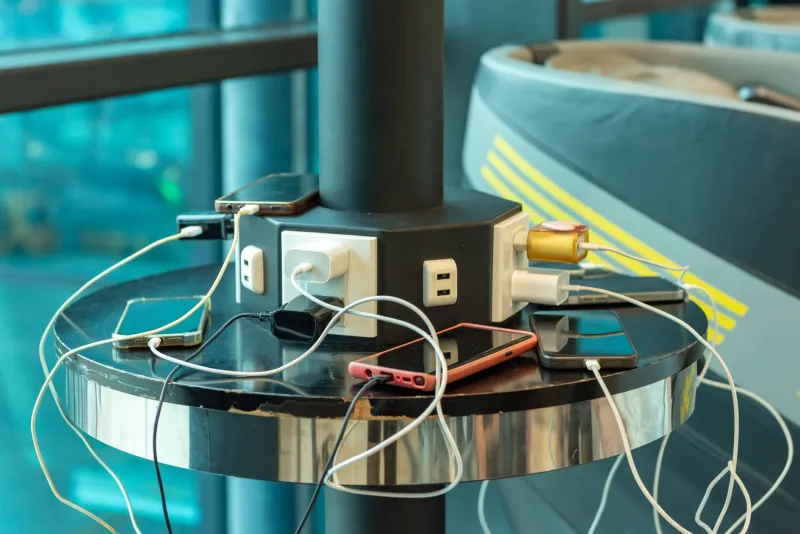
Expo demos are not normal use. Screens run at high brightness, radios are congested, and devices loop video for hours. That makes charging infrastructure a necessity. But the scale of that infrastructure is still informative. A booth that keeps one spare power bank per demo unit is managing normal demo fatigue. A booth that keeps a drawer of emergency batteries, a fan of adapters, and a staff member dedicated to swap duty is managing a battery problem.
This is not a definitive test. It is a census. The goal is to count what the booth reveals about how much energy the product needs to keep its promise standing upright.
Six Signals to Count at CES 2027
-
Spare power banks per live demo. Count the batteries visible near the demo units and compare that number with the number of devices on display. A high ratio suggests the demo drains quickly or that the product’s own battery is not trusted for a full day.
-
Adapter diversity. A booth stocked with USB-C, micro-USB, Lightning, and proprietary docks is supporting an installed base, which can be good. But if the demo itself needs a proprietary adapter to charge, ask why. Standard charging is a retail advantage.
-
Cable length and strain relief. Short tethers and reinforced connectors usually mean the demo has been engineered for repeated handling. Loose cables and taped connectors suggest improvisation. Neither proves battery life, but both reveal how much polish the product has received.
-
Battery-swap choreography. Watch how often staff swap batteries or plug in a device. A wearable that needs a charge every two hours on the show floor is not necessarily a failure, but it is a data point. Ask whether the retail unit uses a sealed battery or a user-replaceable one.
-
Wattage disclosure. Chargers labeled with wattage and supported fast-charging standards are easier to evaluate. Unlabeled bricks and generic cables make it harder to know whether the device is drawing power efficiently or simply surviving.
-
The emergency drawer. Ask staff what fails most often during a demo. The answer may be heat, wireless connectivity, or battery drain. A candid answer is more useful than a polished one.
Turning Observations Into a Watchlist
A simple note-taking habit can turn the census into a comparison tool. For each product, record the advertised endurance, the number of visible spare batteries, the charging standard, and the swap interval observed during the demo.
| Signal | What it may suggest | What to ask |
|---|---|---|
| Multiple power banks per unit | High demo drain or low confidence in onboard battery | What is the measured screen-on time at 50% brightness? |
| Proprietary charging dock | Accessory dependence or a sealed design | Will the retail package include the dock? |
| Frequent battery swaps | Short endurance under load | Is the battery replaceable by the user? |
| Unlabeled chargers | Vague power architecture | What wattage and standard does the device support? |
| Staff dedicated to charging | Demo logistics outweigh product confidence | What happens in a normal 10-hour day? |
A Realistic Battery Watchlist for US Buyers
For wearables, a booth that charges demo units overnight is normal. A booth that swaps batteries every few hours during a show day is worth a follow-up. Ask about always-on display settings, GPS use, and cellular duty cycles.
For AR glasses and headsets, battery life is often the quiet constraint. Count the battery packs worn by demo staff and ask whether the retail configuration includes a tethered pack or an external battery. A light frame can hide a heavy power requirement.
For handheld PCs and mobile devices, watch how many units are plugged in during active demos. A device that runs a video loop for eight hours is not the same as one that runs a game or a video call for eight hours.
For robots, cameras, and smart-home devices, the charging station may be a dock rather than a cable. Ask about standby drain, recharge time, and what happens when the device loses power during a routine.
The Limits of the Method
The charging table is a signal, not a sentence. A booth may over-provision batteries because the show floor is unusually demanding, not because the product is weak. A product with a small battery may be optimized for a short, specific task. And a well-stocked charging station cannot substitute for measured review data. The census is most useful when it prompts better questions and when it is compared across booths.
What to Do on the Floor
Spend five minutes at the edge of a booth’s charging area before approaching the demo. Count the spare batteries, note the adapters, and watch the swap routine. Then ask the staff how the retail unit will differ from the show unit. The answer will not settle the battery question, but it will make the spec sheet easier to read. For US early adopters, that is the practical value of the charging station census: it turns a marketing claim into a watchlist item.